
Recurring activity
What Are Recurring Charges? How Can You Monitor Them for Changes?
By FlowRadar Editorial Team · 8 min read
Published · Updated
Recurring charges can make routine payments convenient, but their familiarity also makes changes easy to overlook. A service can move from a promotional rate to its regular price, a variable bill can rise, or an annual renewal can arrive long after someone first enrolled.
A recurring charge is not automatically unwanted or incorrect. The useful question is whether the amount, timing, merchant, and service still match what you expect. This guide explains what recurring charges are, what can change, and how to review them without treating every difference as fraud.
What is a recurring charge?
A recurring charge is a payment authorized to repeat according to an agreement or billing pattern. It may be charged to a bank account, debit card, or credit card. The amount may be fixed or variable, and the payment may occur monthly, weekly, annually, or on another schedule.
The Consumer Financial Protection Bureau (CFPB) explains that automatic bank-account payments may use the same amount each time or amounts that vary within an authorized range. The agreement matters: a repeating transaction does not necessarily mean you agreed to an unlimited amount or an indefinite service.
There is also a useful distinction between two payment arrangements. With a merchant-initiated automatic payment, you authorize a company to take payment. With recurring bill pay, you instruct your bank or credit union to send payment. CFPB describes these as different ways of arranging payments; check which method you use before changing it.
Common examples
Recurring activity can include many ordinary household or business payments:
- Streaming, software, cloud storage, and digital subscriptions
- Gym, club, or membership dues
- Insurance premiums
- Utilities and communications services
- Mortgage, loan, or credit-card automatic payments
- Childcare or other repeating services
- Annual renewals that may not appear monthly
A recurring pattern is broader than a subscription. A utility payment or loan payment can repeat without being a subscription, and not every repeated charge is identical in amount. Similar amounts alone also do not establish that two transactions belong to the same agreement.
Fixed and variable recurring charges
Fixed patterns often repeat at roughly the same amount and interval. A monthly software plan, for example, may remain steady until its price or your plan changes. Even a usually fixed payment deserves occasional comparison with the bill or agreement.
Variable patterns may change with usage, taxes, fees, rate adjustments, or the terms of the authorization. A larger utility bill may reflect higher use rather than an incorrect charge. CFPB's explanation of automatic bank-account payments covers both consistent amounts and amounts that vary within an authorized range.
Annual and quarterly renewals are easier to forget because the gap is longer. Looking only at last month's transactions may miss the relevant comparison. Keep the renewal notice and compare the charge with the earlier renewal and current terms when available.
Why the amount, date, or merchant description may change
An unfamiliar difference can have an ordinary explanation. Practical possibilities include:
- A promotional period ends
- A service changes its price
- Usage changes a variable bill
- Taxes or fees change
- The billing date shifts around weekends or statement cycles
- The merchant or payment processor uses a different statement descriptor
- An annual or less-frequent renewal posts
A change is a reason to compare the transaction with the agreement, invoice, or prior history. It is not proof of an error or fraud.
What to check when a recurring bill goes up
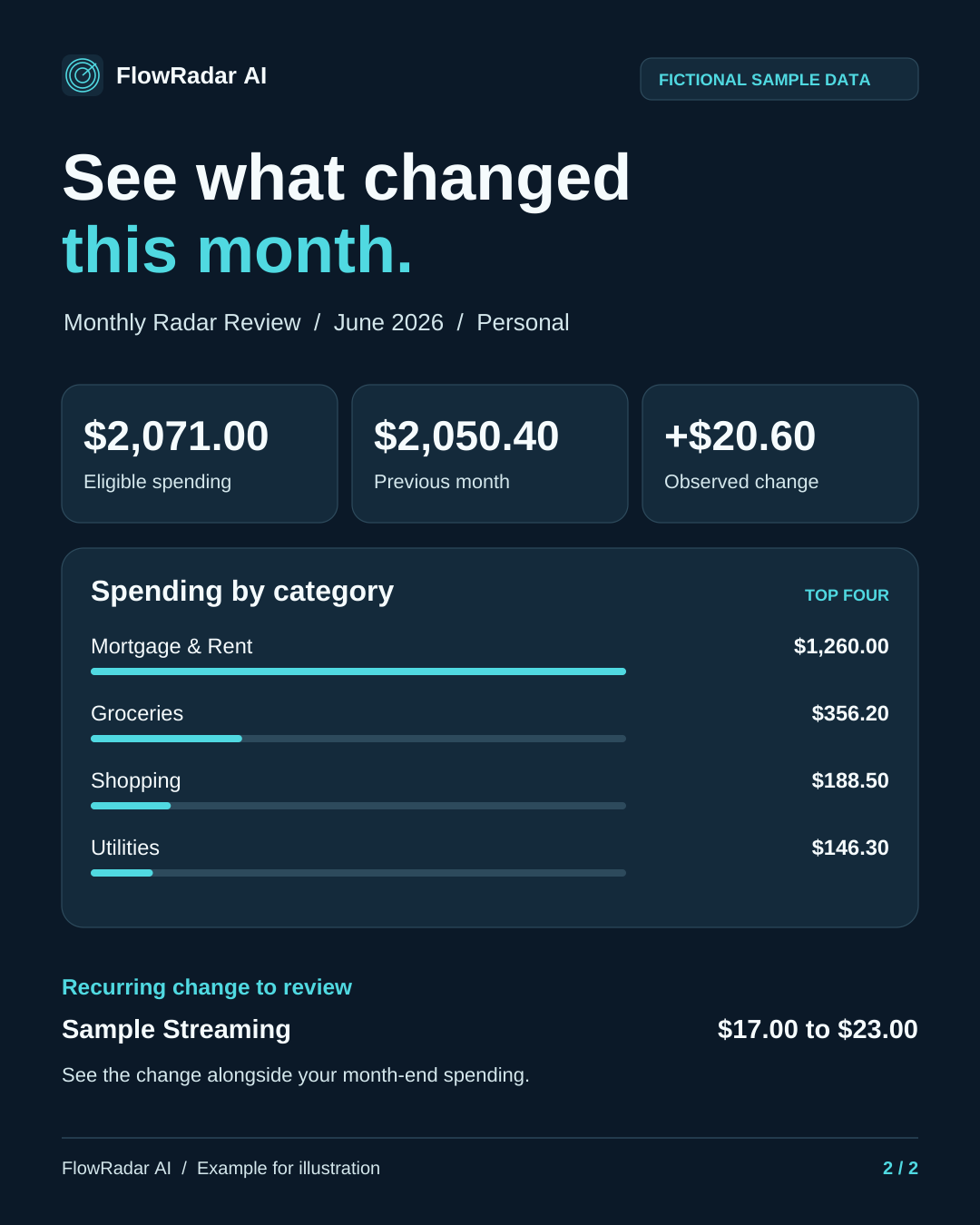
Consider a fictional monthly streaming bill that rose from $17 to $23, an increase of $6. First, compare the merchant, account, and billing dates with earlier posted transactions. If the merchant and monthly billing pattern match, check the latest invoice or renewal email for a price change, an expired promotion, or a different plan.
The sample Monthly Radar Review shows the previous and current amounts together. Use that comparison to decide what to check next. If the invoice explains the increase, you can record it as expected. If the amounts still do not match, check with the merchant.
A recurring-charge review checklist
Use the full transaction record and supporting documents rather than making a decision from a short merchant name alone.
- Confirm the account and full statement descriptor.
- Compare the current amount and date with earlier transactions from the same source and account.
- Check invoices, receipts, renewal notices, and promotional terms.
- Confirm whether another authorized household member or business user recognizes it.
- Decide whether the change is expected, needs investigation, is resolved, or is not useful as a future signal.
- Contact the merchant using independently verified contact information when the charge needs clarification.
- Contact the bank or card issuer promptly if the charge is unauthorized, incorrect, or continues after a valid cancellation.
What if you want the payments to stop?
Stopping an automatic payment method may not cancel the underlying contract or amount owed. Review the service agreement and cancellation instructions separately from the instructions for changing how you pay.
For automatic bank-account payments, CFPB advises contacting the company and the bank or credit union when revoking authorization and keeping records. Explain which authorization you are revoking and retain copies of your communications. Ask your institution about its process rather than assuming that removing a payment method finishes every step.
The Federal Trade Commission (FTC) advises reviewing cancellation instructions, saving cancellation records, and monitoring statements for later charges. Keep confirmation emails, reference numbers, and relevant dates together so you can explain what happened if another charge appears.
If a charge appears unauthorized or continues after cancellation, follow the bank or card issuer's dispute process promptly. Requirements can depend on the payment method and circumstances; your institution can explain the steps that apply. This guide does not provide individualized legal advice.
CFPB: How to stop automatic payments from your bank account
FTC: Getting in and out of free trials, auto-renewals, and subscriptions
How FlowRadar supports recurring-charge review
FlowRadar uses available read-only transaction data from eligible connected accounts. It can help surface recurring expense and income patterns and changes worth reviewing. A recurring income stream and a recurring expense are different kinds of activity; neither is automatically a problem.
Members can use recurring-status controls, transaction search, account/category/date filters, filtered totals, and exports to compare surrounding activity. Comparing the same source and account can help keep unrelated transactions from being mistaken for a single pattern.
Insights and Monthly Radar Review help organize selected-period activity. Financial Review explains why qualifying activity stood out and lets the member record a conclusion. These views provide context for your review rather than deciding whether a payment is valid.
Institution synchronization varies and connected data is not real time. Available history and details can differ by institution and account. A transaction that has not arrived in connected data cannot yet be reviewed there; consult your institution's records when you need the authoritative account view.
FlowRadar cannot move money, cancel a subscription, contact a merchant, file a dispute, or declare fraud. The member and financial institution remain responsible for final decisions and account actions.
Learn why FlowRadar was built, find answers in FlowRadar Help, or review our privacy practices.
A simple monthly habit
Set aside a short monthly review for recurring activity. The aim is a clear record of what you checked, not an assumption that every change needs an alert or a dispute.
- Scan recurring activity
- Compare unexpected changes with prior history
- Verify renewals and variable bills
- Record conclusions
- Keep relevant receipts or cancellation records
A small, consistent review can make it easier to recognize an expected change next time. Keep unresolved questions separate from resolved ones, and return to the original documents when the transaction data alone does not explain the difference.
For a broader routine, explore the Financial Visibility Guide.
Sources and further reading
- CFPB: How automatic payments from a bank account work
- CFPB: How to stop automatic payments from your bank account
- FTC: Getting in and out of free trials, auto-renewals, and subscriptions
- Plaid Transactions documentation: recurring outflows and inflows
Plaid's official Transactions documentation describes recurring transaction streams that may include recurring outflows and inflows. Available data varies by institution and account.
This article provides general educational information and is not financial or legal advice.